
Dr. Driving 2
SUD Inc.Racing
4.34.03K Reviews
- Version
- 1.66
- Installs
- 100.00M
- Age Rating
- Teen
Screenshots
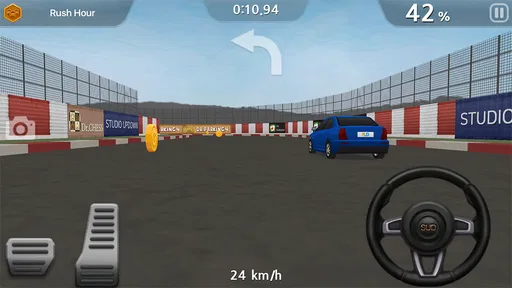
Our Review of Dr. Driving 2
 Analysis by Appyee
When several people share a phone or tablet, a driving game can be an easy way to fill a short wait without turning the device into a long project. Dr. Driving 2 is a mobile racing-category game from SUD Inc., though its appeal is more about handling driving tasks than chasing a traditional race. I’d consider it for a household that wants quick turns at simple challenges, while keeping in mind that shared-device play needs a little coordination of its own.
A game that suits short shared turns
The useful household question is not only whether everyone likes cars, but whether the game fits the way a shared device is used. The straightforward steering, accelerator, and brake setup makes it relatively easy to pass the phone to another person and let them try a mission. Parking or fuel-efficiency challenges can feel more approachable for a casual player than a fast race that demands constant attention from the first second.
That makes it a reasonable choice for a quiet stretch at home, such as waiting for dinner or taking turns during a relaxed afternoon. I would keep sessions informal: one person can try a challenge, then hand over the device, rather than treating a shared account or progress as a family competition. The game’s appeal depends on enjoying its driving tasks; someone who only wants high-speed racing may find the pace and focus different from what they expected.
Simple controls, with a little room to learn
The controls are easy to understand, but that does not mean every task will feel effortless. Steering and balancing acceleration against braking still take practice, especially when a challenge calls for careful positioning instead of simply reaching a finish. For a new player, I’d start with a forgiving mission and treat early attempts as practice. That is more useful than immediately comparing scores with someone who already knows how the car responds.
A practical tip for shared play is to let each person finish a full attempt before swapping. Constantly changing drivers mid-challenge makes it harder to judge whether a result came from the controls or from a different play style. It also avoids one person unintentionally taking over another’s run. The game is at its best when the player has enough time to understand the task, make a mistake, and try again.
Progress and spending boundaries
The game includes cars to unlock and parts to upgrade, so progress can give regular players a reason to return. In a shared household, though, it is worth agreeing on who is using the device and whether purchases are allowed before leaving it in someone else’s hands. The game is free to download, with in-app purchases ranging from $1.99 to $99.99 per item; that range makes it sensible to check purchase settings on the device rather than assume every user will treat spending the same way.
Coins and upgrades can encourage a bit of grinding. I would avoid presenting purchases as the shortcut everyone needs: the game can be played without paying, while optional spending may appeal to someone who wants to move faster. If children or other family members share the device, a clear household rule—ask before making any purchase—is more useful than relying on an unspoken assumption. That is a device-use boundary, not a claim that the game provides family controls.
Who should play, and who may prefer another style
Compared with typical mobile racers built around speed, overtaking, and race finishes, this one puts more weight on driving challenges such as parking and fuel efficiency. That distinction is important. If I wanted a quick burst of arcade racing, I would choose a game designed around races; if I wanted to practise careful steering in bite-sized tasks, this is closer to the mark. Its multiplayer option adds competition, but it does not change the basic appeal of the driving missions.
The game is a better fit for people who enjoy improving through retries than for anyone who gets annoyed by repeating a task to earn progress. Upgrades and customization offer goals, but they can also make the experience feel like a grind. A player who wants a purely relaxed experience may prefer to ignore score chasing, while someone looking for deep simulation should not mistake simple mobile controls for a detailed driving simulator.
Age, trust, and expectations
It carries a Teen content rating, a useful point for adults deciding whether it is appropriate for a younger player, but a rating is not a substitute for knowing the person using the device. I’d explain that the game includes online multiplayer and optional purchases before handing it over, then set ordinary expectations about playing and spending. The app’s popularity—over 100 million installs and an average rating of 4.3 from around 801,000 ratings—suggests broad reach, but those figures cannot tell a household whether its particular players will enjoy the challenge style.
One practical boundary is to keep multiplayer play separate from any promise that a child should interact with strangers or share personal details. I would describe the online element plainly and supervise according to the player’s age and comfort. For a household that wants an entirely offline shared activity, this may not be the best first choice unless the players are content to focus on the solo challenges.
It was released on February 24, 2017, and the current version is 1.66, with Android 6.0 as the minimum operating system. Those details matter if an older shared phone is involved: check compatibility before planning a family turn-taking session. The game is free, but the optional purchases and online competition are worth discussing up front so no one is surprised later.
Alright, folks, let’s dive into the world of Dr. Driving 2. If you’re anything like me, you’ve probably spent way too many hours trying to master the art of virtual driving. This game is the sequel to the original Dr. Driving, and let me tell you, it brings a whole new level of fun and challenge to your smartphone. Whether you’re commuting or chilling at home, this game can be your next go-to for killing some time.
Gameplay and Features
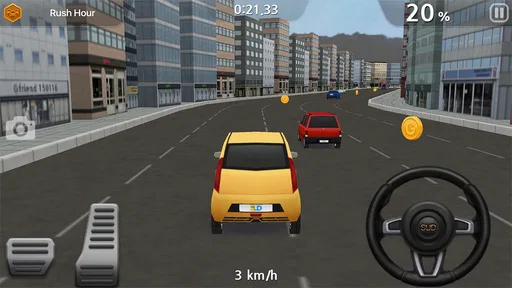
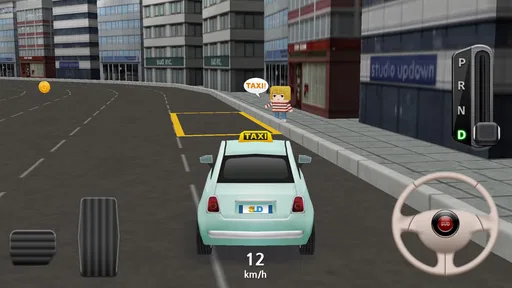
So, what’s the scoop on Dr. Driving 2? Well, the game keeps it simple with its controls, making it easy for anyone to pick up and play. You’ve got the usual steering wheel, gas pedal, and brake, but the real magic is in the game modes and missions. You can take on various challenges that test your driving skills, like parking, speeding, and even fuel efficiency. Each mission is like a mini-adventure, and trust me, you’ll be hooked trying to beat your previous scores.
One of my favorite parts? The multiplayer mode. It’s always fun to challenge your buddies or random players online. You get to show off your driving prowess and climb the leaderboards. It’s competitive, exciting, and sometimes downright nerve-wracking, but in a good way!
Graphics and Sound
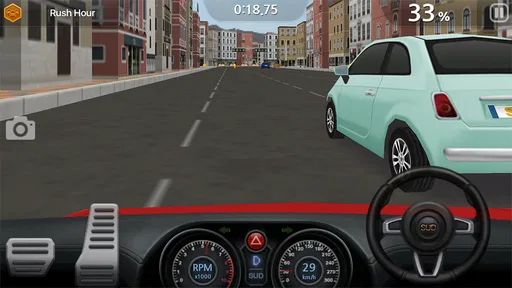
Let’s talk about the visuals. The graphics in Dr. Driving 2 are a definite upgrade from its predecessor. The environments are more detailed, and the cars look fantastic. It’s not like you’re playing on a console or anything, but for a mobile game, it’s pretty impressive. The sound effects add another layer of immersion. From the revving engines to the screeching tires, you’ll feel like you’re right there in the driver’s seat.
Oh, and did I mention the music? It’s catchy enough to keep you entertained without being too distracting. Plus, you can always mute it if you prefer to listen to your own playlists while driving. I mean, who doesn’t love a good driving playlist?
Customization and Upgrades
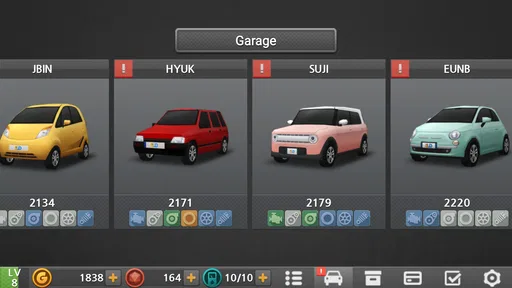
Now, if you’re someone who loves to tweak and upgrade, this game’s got you covered. It offers a variety of cars that you can unlock and customize. You can upgrade different parts like the engine, tires, and brakes to improve performance. It’s a bit of a grind, but that’s part of the fun. Earning coins and making your car the ultimate driving machine is pretty satisfying.
And let’s not forget about the aesthetic customizations. You can change the color of your car or add some decals to give it a personal touch. It may not affect your driving skills, but hey, style points matter too!
Challenges and Rewards
If you’re in it for the long haul, the game offers daily challenges and rewards. Completing these can earn you extra coins or even special items. It’s a great incentive to keep coming back and improving your skills. Plus, who doesn’t love a little extra reward for their efforts?
The game does have some in-app purchases, but they’re not necessary to enjoy the game. You can totally play and progress without spending a dime. But if you’re impatient or want to support the developers, the option is there.
Overall, it’s a fun way to pass the time and test your driving skills. It’s got a little bit of everything, from competitive multiplayer to relaxing single-player missions. Whether you’re a seasoned driver or a newbie, there’s something here for you. So, buckle up and hit the road. You won’t regret it!
My household verdict
I’d recommend it to a household that enjoys taking turns, short driving challenges, and gradual car progress, especially if different players can agree on spending and online-play boundaries. It is less suitable for someone who wants a dedicated racing experience, a detailed simulator, or a completely hands-off solo pastime. The strongest reason to try it is the mix of accessible controls and tasks that reward patience; the main trade-off is that improving and unlocking cars can take repeated play.
For a shared-device scenario, I’d start by checking that the phone meets the Android requirement, making a simple rule about purchases, and choosing a time when players can finish an attempt before handing the device over. That small bit of coordination helps keep progress and expectations clear without turning a casual game into a household argument. If everyone is comfortable with those boundaries, this offers a light, competitive driving diversion; if not, a simpler offline game or a conventional racing title may be a better fit.
How Dr. Driving 2 Compares
Full ComparisonChoose Hill Climb Racing for physics-based hill runs and offline play, Dr. Driving for focused city-driving missions, or Dr. Driving 2 for a more polished driving sim with multiplayer.
| App | Developer | Rating | Price |
|---|---|---|---|
 Hill Climb Racing | Fingersoft | 4.3 | Free |
 Dr. Driving | SUD Inc. | 4.2 | Free |
 Dr. Driving 2This App | SUD Inc. | 4.3 | Free |
Verdict
Strengths of Dr. Driving 2
- Realistic driving physics enhance gameplay.
- Diverse missions keep players engaged.
- Intuitive controls suitable for all ages.
- Smooth graphics for a seamless experience.
- Multiplayer mode adds competitive fun.
Limitations of Dr. Driving 2
- In-app purchases can be expensive.
- Limited customization options for cars.
- Ads can interrupt gameplay frequently.
- Requires internet for some features.
- Progress can feel slow without purchases.
Other Releases by SUD Inc.
View All
Dr. Driving
Racing4.2
Similar Picks in This Category
View All
Hill Climb Racing
Fingersoft4.3
Dr. Driving
SUD Inc.4.2

Traffic Rider
skgames4.5

Asphalt 8 - Car Racing Game
Gameloft SE4.6

Race Master 3D: Car Racing
Beresnev Games4.6

Extreme Car Driving Simulator
AxesInMotion Racing4.3
You May Also Like
View All
Frequently Asked Questions
What are the main features of Dr. Driving 2?
Dr. Driving 2 offers a realistic driving experience with enhanced graphics and physics. It includes multiple game modes, such as speed racing and parking challenges, and features a variety of vehicles to unlock and upgrade. The game also allows for real-time online multiplayer competitions, adding an exciting competitive element.
Is Dr. Driving 2 free to play?
Yes, Dr. Driving 2 is free to download and play on both Android and iOS platforms. However, it includes in-app purchases that allow players to buy coins and gems for unlocking vehicles and upgrades. While these purchases can enhance the gameplay experience, they are not necessary to enjoy the game.
How does Dr. Driving 2's multiplayer mode work?
The multiplayer mode in Dr. Driving 2 lets you compete against players from around the world in real-time. You can challenge your friends or match with random opponents. Winning races helps you earn rewards and climb the global leaderboards, enhancing both your skills and your standing in the game community.
What are the system requirements for Dr. Driving 2?
For Android users, Dr. Driving 2 requires Android version 4.1 or higher. iOS users need iOS 8.0 or later. The game is optimized for both smartphones and tablets, but having a device with a decent processor and graphics capability will ensure smoother gameplay and better performance.
Does Dr. Driving 2 offer any offline gameplay?
Yes, Dr. Driving 2 can be played offline in single-player mode. You can enjoy various missions and challenges without an internet connection. However, features like multiplayer races and leaderboard updates require an internet connection to function.
Play our best games!


